
“I had no idea that’s something a designer can do for me!” — One of my DPC clients, when I explained how I can help with EMR selection
This is one of those areas that is really unusual for someone to delve into whose simplified title is “branding and marketing expert.” But, because I am really conscientious about ALL the ways that people interact with a brand (i.e. your business), I am also pretty expansive in the ways I get involved in what would traditionally be deemed more operations decisions for clients who understand the value of integrating the branding and operations to create a better experience — for your patients, and often for you, too.
Being a systems thinker, this is just a natural way my brain thinks and works — to think about the big picture and all the details that support the big picture, and the rewards and risks that can happen. So, this is one reason I get really into something like helping my clients who want help finding the Electronic Medical Records/Electronic Health Records systems that will be a good fit for them.
And it really should be a great fit. This is the piece of your tech stack that you will be touching more than any other. You will perform dozens, or possibly even hundreds of functions within this environment in any given day.
“What’s your favorite EMR/EHR system?”
This is a question that gets asked over and over. I’ve seen lots of startup healthcare practices crowdsourcing for answers. And while it might be a way to start gathering a list of options to look at, just because more people say one platform more than others doesn’t mean that’s THE right answer.
It would be nice to be able to boil it down to some universal apples-to-apples constants such as, “Is the user interface easy to navigate?” or “What is the monthly fee for the service for providers and staff?” it’s not that simple.
If someone says “I really like X,” that’s because it is working pretty well for THEIR business’ needs and creates fewer pain points for THEM than other systems. But they don’t know YOUR specific business needs, and they can’t predict what YOUR pain points will be. The same system that works well for them might create a lot of friction points for yours.
So, I’m going to share the process I take clients through.
It’s a bit different than how I actually work with clients on this. With clients:
We’re having discussions about the business plans (both short- and long-term goals) and their needs, and anything else that might impact what might make one EMR more useful for their practice than another.
I’m working to develop and curate their lists of EMR requirements based on those discussions.
I’m also attending demos and giving my feedback on narrowing down the options. This can mean we both sit in on all demos, or it could mean that I’m saving them some time by doing the first rounds myself to look at the functionality from the perspective of UX/UI. Then I make recommendations, and then my client and I both attend the second round of demos and they are asking more of their medical/charting perspective questions.
I’m being another brain providing a perspective that is different than a medical provider’s brain. These are both important perspectives. I won’t be as familiar on charting, and they won’t be as familiar with UX/UI.
I’m assisting in implementing the system and processes.
But there are things that you can do if you really need to do this part yourself because it’s not in the budget. And this is a guide to help you do just that.
Don’t decide too quickly.
Before I get into it, I can promise you it is well worth the time and effort to research, demo, and compare your options upfront. Otherwise you get into sunk cost fallacy territory later where the time, energy, downtime, and cost to switch to another system becomes a much more daunting prospect.
The Guided Plan
Step 1: Look at your business plan.
Review your business plan, and start taking notes on what an EMR needs to functionally provide in order to support your specific practice.
A few examples:
An EMR that is built for insurance-based medical offices is not going to have the right functionality for a DPC practice that is membership-based.
A practice that is adults-only does not have much need to have patient portal accounts that manage an account for a minor child. But this is really helpful functionality to have in family medicine practices.
Some EMRs have links to allow people to easily self-schedule, without logging into the portal; this makes it possible for people to self-schedule an intro chat, since they wouldn’t have an account set up yet. Some do not, so you’d need to account for that with another system or manually scheduling all intro chats.
Some EMRs have the ability to be customizable in order to allow for inclusive language for practices that see LGBTQIA+ patients, so that is important for some practices to investigate.
Some EMRs integrate with some other tech that’s part of your tech stack plan, and some don’t. How much friction will that add to your processes?
And there are SO many more factors. So you need to start coming up with a list of functionality that will support YOUR business plan and your needs.
Step 2: Take your time coming up with your functionality requirements list.
As you have conversations about who your ideal patient is, or how you want things to flow, or how quickly you plan to add non-medical staff, or medical staff, or no staff at all, other functionality items can get added to your list.
Examples:
If you decide your practice is mostly going to focus on younger families, those people are probably more tech savvy and may want more self-service options in a patient portal. If your patient panel is going to skew older, a simpler interface with less self-service (but also spending less time walking people through HOW to use their patient portal) might be best.
If you plan to have an assistant at some point, what are their costs to be on the platform if they are not a medical provider?
Things you might not have thought of initially may filter into your mind as you are working on getting other things in order.
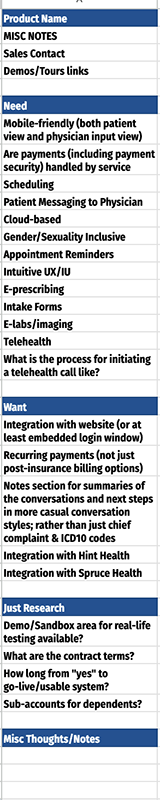
The List
The image example I am providing is an example I did for one client, for their business. This is not a universal list. I’m just showing how I organized it the list using their requirements.
Step 3: Organize your list.
Once you’ve spent some time coming up with that list, it’s time to organize it:
Break the list into 3 groups:
Your absolute must-haves
The nice-to-haves: the things that might not make or break a decision on choosing an EMR, but would make things easier for you if they were there — and these are items that might help you find a tie breaker between a couple of finalists options
Things you just need information on, like “What are the payment transaction fees?” for this platform
Then create a spreadsheet.
In the left column, put your Must-haves at the top, the Nice-to-haves below those (with some kind of visual separator) and then your For information only below those. See the image for reference.
Then across the top, put the name of the EMR/EHR platform in its own column.
Now you have your matrix for evaluating.
Step 4: Schedule your Round 1 demos and take notes.
Most of the demos will be some sales person walking you down a very clean path of how everything flows when everything is ideal. And it will probably look great. But the matrix is what will help guide questions so that you get answers you need.
Take notes in the cell for that line item in the column for that platform. Those notes will help you later, and may help you come up with more questions for round 2.
If something isn’t clear, ask for clarification. And if they don’t know, ask them to find out and follow-up with you.
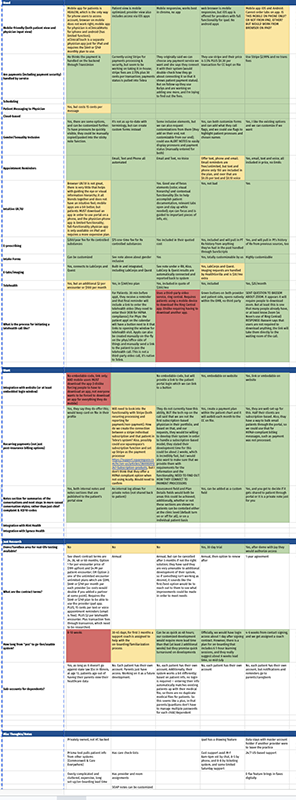
Colors Help the Decision Clarity
You can start to see that some EMR platforms offer a lot of what this client needed vs others which only offer partial needs.
Names of the platforms are not included on this image in order to not bias anyone for or against any particular platform.
Step 5: After your demo call, review your list.
For items that the platform looks like it will solidly be able to provide that functionality, make that cell background color green.
For functionality that seems like it doesn’t quite meet your needs, or maybe it is still being developed, or you figure out you need more information before you can fully evaluate, mark it with a yellow background.
For functionality that is just not there, doesn’t meet your needs, seems clunky, or otherwise just isn’t a good fit, mark those cells in a red background.
Once you have done all your first round demos, look at your spreadsheet. Because of the colors, it will be much easier to see which options are providing more green must-haves and nice-to-haves, and which have more in the yellow and red categories.
That’s going to help you narrow down for your round 2 demos: what’s looking most promising vs. what can you eliminate.
Step 6: Round 2 demos
Round 2 demos are where you ask anything else that occurs to you. Questions that you thought of later, clarity that you’re not quite sure they gave you.
And then ask if they have a sandbox or demo version you can test out. Some will, some won’t. Not having a test environment for you to play around in alone isn’t a red flag. But if they DO have a way you can get in and do a little bit of working in the system, you can start to see for yourself how things flow, and how intuitive it is for your brain before committing to something.
And if you have more questions or need another demo before making a decision, ask those questions. You want to feel good about the decision you are making, you want to feel informed, and you want to feel like you have a good idea of how to start functioning in that environment.
That same client that said “I had no idea that’s something a designer can do for me!” was originally planning to go with a platform that he had used 20 years ago, simply because he was familiar with it. I convinced him to stop and evaluate options. And it turns out the one that he was “just going to go with” was eliminated in the first round for multiple reasons. It’s worth your time to make this choice with intention.